

Box-Jenkins Methodology in EViews: Step-by-Step ARIMA Guide
Knowing the theory of the Box-Jenkins methodology is one thing; building a working ARIMA model from real data is another. This article is the practical companion to my theory post, Box-Jenkins Methodology: Complete ARIMA Forecasting Guide.
Here we skip the derivations and do everything in EViews, click by click and command by command, using a real monthly Consumer Price Index (CPI) series.
By the end, you will be able to take any monthly or quarterly series, test it for stationarity, identify and estimate candidate ARIMA models, choose among them, check the residuals, and produce and evaluate forecasts.
Before you start: data and workfile
The example uses a monthly CPI series, called cpi 'observed', from 2009M02 to 2020M11 (142 observations). To forecast 12 months beyond the last observation, we extend the workfile range to 2021M11. The ARIMA models are estimated on 2009M03 to 2020M11, which is 141 observations, because differencing uses up the first one.
▶ Set up the workfile (using menu)
- Go to File > Open > Foreign Data as Workbook… and select your Excel or CSV file. Follow the wizard and check that the date structure is detected as Monthly.
- To extend the range for forecasting, go to Proc > Structure/Resize Current Page… and change the End date to
2021m11. - Save the workfile with File > Save As….
▶ EViews Command (type in the Command window)
wfopen "C:\data\cpi.xlsx"      ' import the data (change the path)
pagestruct(end=2021m11)         ' extend the range by 12 months for forecasts
smpl 2009m02 2020m11            ' set the sample to the observed data
The workflow at a glance
| Box-Jenkins stage | EViews tool | Decision you make |
|---|---|---|
| Identification | Line graph; Correlogram; Unit Root Test | Is the series stationary? What are  , ,  and and  ? ? |
| Estimation | Quick > Estimate Equation (ARMA terms) | Which candidate model fits best (AIC, SBC, HQC, significance)? |
| Diagnostic checking | Residual Diagnostics; ARMA Structure (roots) | Are the residuals white noise? Is the model stable? |
| Forecasting | Proc > Forecast; forecast evaluation statistics | How accurate is the forecast? |
Step 1: Plot the series
Always look at the data first. A graph reveals trends, seasonality, breaks and outliers that no test can describe as vividly.
▶ EViews Steps (menu path)
- Double-click the series
cpiin the workfile window to open it. - Click View > Graph….
- Under Graph type > Basic type, choose Line & Symbol (or Line) and click OK.
▶ EViews Command (type in the Command window)
cpi.line
✎ How to interpret this output
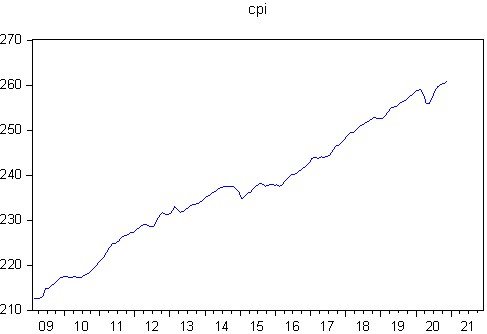
CPI climbs from roughly 212 at the start of the sample to about 260 at the end. This persistent upward movement means the mean is not constant over time, which is the first sign of non-stationarity. There is also a short-lived dip around 2020 that stands out from the otherwise smooth path. No seasonal pattern is visible to the eye, so we proceed with a non-seasonal ARIMA model.
Conclusion of Step 1: the series is trending and probably non-stationary; we confirm this with the correlogram and a formal unit root test.
Step 2: Correlogram of the level series
▶ EViews Steps (menu path)
- With
cpiopen, click View > Correlogram…. - Under Correlogram of, select Level.
- Set Lags to include to
36(a reasonable choice for monthly data, i.e. three years) and click OK.
▶ EViews Command (type in the Command window)
cpi.correl(36)
✎ How to interpret this output
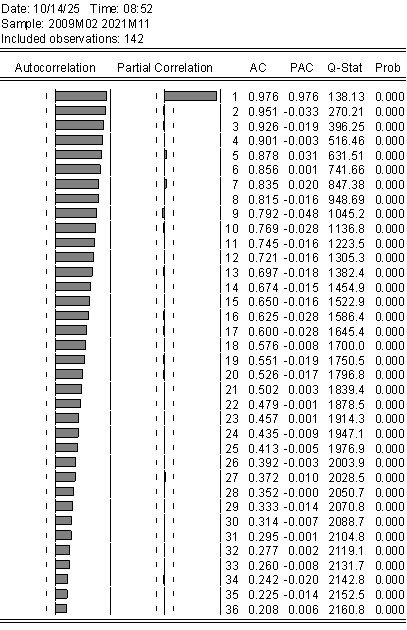
EViews shows the autocorrelation function (AC), the partial autocorrelation function (PAC), the Ljung-Box Q-statistic, and its p-value (Prob) for each lag.
- AC: the first autocorrelation is 0.976, and the values decay very slowly: 0.721 at lag 12, 0.435 at lag 24, and still 0.208 at lag 36. A stationary series would show a much faster decay.
- PAC: a single large spike at lag 1 (0.976), after which the partial autocorrelations are close to zero.
- Q-statistic: every Prob is 0.000, so the null of no autocorrelation is rejected at all lags.
Conclusion of Step 2: slow-decaying ACF together with a PACF that cuts off after lag 1 at a value close to one is the classic fingerprint of a non-stationary (unit root) series. We now confirm it formally.
Step 3: Unit root test and the order of integration (d)
The Augmented Dickey-Fuller (ADF) test has the null hypothesis that the series has a unit root (non-stationary). The decision rule is simple: if the p-value is below 0.05, reject the null and conclude the series is stationary; otherwise, do not reject it.
3A. ADF test on the level series
▶ EViews Steps (menu path)
- Double-click
cpito open it, click View > Unit Root Tests > Standard Unit Root Test…. - Test type: Augmented Dickey-Fuller.
- Test for unit root in: Level.
- Include in test equation: Trend and intercept (since the series has a trend).
- Lag length: Automatic selection, Schwarz Information Criterion, and maximum lags
13(EViews proposes this value automatically for 142 monthly observations). - Click OK.
▶ EViews Command (type in the Command window)
cpi.uroot(adf, trend, info=sic, maxlag=13)
✎ How to interpret this output
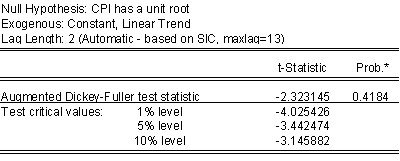
Compare the ADF t-statistic with the critical values. The statistic (-2.3231) is less negative than even the 10% critical value (-3.1459), and the p-value (0.4184) is far above 0.05. We therefore fail to reject the null hypothesis: CPI has a unit root and is non-stationary in levels. This agrees with the graph and the correlogram.
3B. ADF test on the first difference
▶ EViews Steps (menu path)
- Reopen the unit root dialog: View > Unit Root Tests > Standard Unit Root Test….
- Change Test for unit root in to 1st difference. Keep the other settings and click OK.
▶ EViews Command (type in the Command window)
cpi.uroot(adf, trend, dif=1, info=sic, maxlag=13)
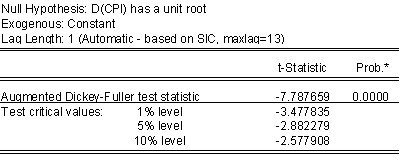
✎ How to interpret this output
The statistic (-7.7642) is far more negative than the 1% critical value (-4.0254) and the p-value is 0.0000. We reject the null: the first difference of CPI is stationary.
Conclusion of Step 3: CPI is integrated of order one,  , so
, so  in the ARIMA(p, d, q) model. EViews will do the differencing for us inside the equation by using
 d(cpi).
Practical notes: (i) after differencing, the trend term is no longer needed, and a constant-only specification is normally used for D(CPI); with a statistic as extreme as -7.76 the conclusion does not change. (ii) You can repeat the test with the Phillips-Perron test (Test type: Phillips-Perron) or the KPSS test (null: stationarity) as a robustness check.
Step 4: Difference the series and identify p and q
Now that , we study the correlogram of the differenced series to decide which AR and MA terms to try. We create the differenced series explicitly so that we can graph it and look at it.
>_ EViews Command (type in the Command window)
series dcpi = d(cpi)      ' first difference of CPI
dcpi.line                 ' line graph of the differenced series
dcpi.correl(36)           ' correlogram of the differenced series
▶ Alternative: do it from the menu without creating a new series.
- Open
cpiand click View > Correlogram…. - Select 1st difference under Correlogram of, keep 36 lags, and click OK.
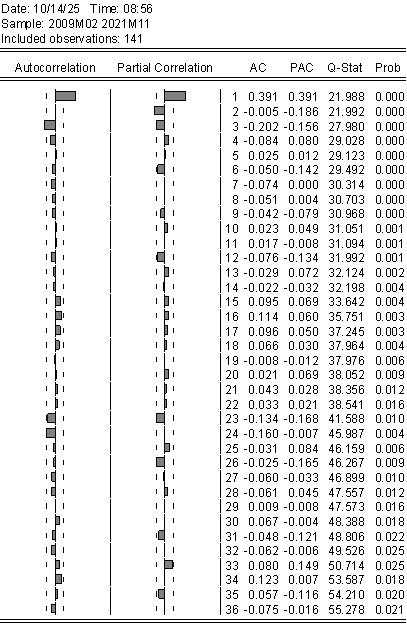
✎ How to interpret this output
With 141 observations, the approximate 95% confidence band for a single autocorrelation is  . Bars or values outside this band are significant.
- AC: lag 1 is clearly significant (0.391) and lag 3 is significantly negative (-0.202). Most other lags are inside the band.
- PAC: lag 1 is significant (0.391) and lag 2 is also significant (-0.186); lag 3 (-0.156) is borderline.
- Q-statistics: all p-values are small (0.000 to 0.025), so D(CPI) is clearly autocorrelated and there is something for an ARMA model to explain.
The pattern does not match a single textbook process. Recall the rules: if the PACF cuts off and the ACF tails off, think AR; if the ACF cuts off and the PACF tails off, think MA. Here the PACF points to a short AR term (lag 1), while the ACF points to an MA term (lag 1 and/or lag 3).
Candidate models: we do not try to guess a single correct answer. Instead we shortlist two plausible models and let the estimation step decide:
- ARIMA(1, 1, 1): AR(1) and MA(1) terms.
- ARIMA(1, 1, 3): AR(1) and MA(3) terms (the MA(3) term captures the lag-3 spike).
Step 5: Estimate the ARIMA models
In EViews, you write the ARIMA model as a regression of the differenced dependent variable on a constant plus AR and MA terms:
d(cpi): the dependent variable, the first difference of CPI (this is the “I(1)” in ARIMA);c: the constant;ar(1): a first-order autoregressive term;ma(1)orma(3): a moving-average term at lag 1 or lag 3.
Spelling out a lag, e.g. ma(3), adds only that lag. To include all of lags 1 to 3 you must write ma(1) ma(2) ma(3).
5A. Estimate ARIMA(1, 1, 1)
▶ EViews Steps (menu path)
- Go to Quick > Estimate Equation….
- In Equation specification type:
d(cpi) c ar(1) ma(1) - Method: LS – Least Squares (NLS and ARMA). Set the Sample to
2009m03 2020m11. - Open the Options tab. In the ARMA box set Method to ML (maximum likelihood).
- Click OK. When the output appears, click Name and save the equation as
eq_111.
▶ EViews Command (type in the Command window)
smpl 2009m03 2020m11
equation eq_111.ls(arma=ml) d(cpi) c ar(1) ma(1)
Here is how the estimated output of ARIMA (1, 1, 1) looks in EViews
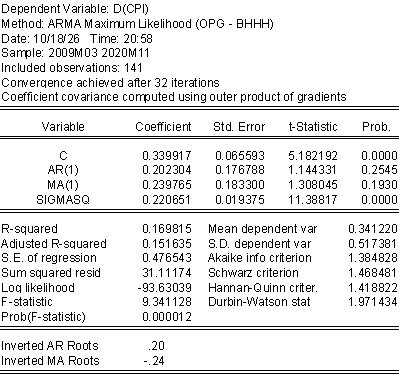
Selected summary statistics: Adjusted R-squared 0.1516; AIC 1.3848; SBC 1.4685; HQC 1.4188; Log likelihood -93.63; Durbin-Watson 1.9714; inverted AR root 0.20; inverted MA root -0.24.
5B. Estimate ARIMA(1, 1, 3) with AR(1) and MA(3)
▶ EViews Steps (menu path)
- Go to Quick > Estimate Equation….
- In Equation specification type:
d(cpi) c ar(1) ma(3) - Keep the same sample and the same ML option as before, click OK, and name the equation
eq_113.
▶ EViews Command (type in the Command window)
equation eq_113.ls(arma=ml) d(cpi) c ar(1) ma(3)

' For comparison, the full ARIMA(1,1,3) with all MA lags would be:
' equation eq_113full.ls(arma=ml) d(cpi) c ar(1) ma(1) ma(2) ma(3)
Here is how the estimated output of ARIMA (1, 1, 3) looks in EViews
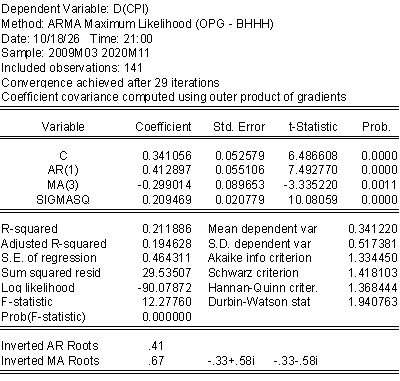
Selected summary statistics: Adjusted R-squared 0.1946; AIC 1.3345; SBC 1.4181; HQC 1.3684; Log likelihood -90.08; Durbin-Watson 1.9408; inverted AR root 0.41; inverted MA roots 0.67 and -0.33 ± 0.58i.
5C. Reading an ARMA estimation table
✎ How to interpret this output
Header block. Dependent Variable: D(CPI) confirms the differencing. Method: ARMA Maximum Likelihood shows the ML option was applied. Sample 2009M03 2020M11, 141 observations shows one observation was lost to differencing. Convergence achieved after 32 (or 29) iterations tells you the numerical optimiser found a solution; if you ever see “convergence not achieved”, do not trust the output (see the troubleshooting section).
The constant C. In an EViews ARMA equation, C is the mean of the differenced series, not an intercept in the usual regression sense. Notice that C (0.34) is almost identical to Mean dependent var (0.3412). The interpretation is: CPI rises on average by about 0.34 index points per month. It is highly significant in both models.
AR(1) and MA terms. These are the dynamics around the mean. In ARIMA(1,1,1) neither AR(1) (p = 0.2545) nor MA(1) (p = 0.1930) is significant, so the model captures very little beyond the average change. In ARIMA(1,1,3), AR(1) = 0.413 (p = 0.0000) says that a month with an above-average CPI increase tends to be followed by an above-average increase (positive persistence in monthly changes), and MA(3) = -0.299 (p = 0.0011) says that part of a shock is reversed three months later. Both are strongly significant.
SIGMASQ. This is the estimated variance of the white-noise error,  . It is lower for ARIMA(1,1,3) (0.2095 versus 0.2207), meaning smaller unexplained variation.
Inverted roots. The inverted AR and MA roots must have modulus below one for the model to be stationary and invertible. All of them do here (0.20, -0.24 in the first model; 0.41, 0.67 and -0.33 ± 0.58i in the second).
Durbin-Watson values (1.97 and 1.94) are close to 2, a first hint of no first-order autocorrelation in the residuals. The formal check follows in Step 7.
Writing the fitted ARIMA(1,1,3) model. Because C is the mean of the differenced series, the estimated model is
![\[(\Delta CPI_t - 0.3411) = 0.4129\,(\Delta CPI_{t-1} - 0.3411) - 0.2990\,\varepsilon_{t-3} + \varepsilon_t\]](https://minhajmetrixhub.com/wp-content/ql-cache/quicklatex.com-dd9266c07c80f6c3db222d7386c515d5_l3.png "Rendered by QuickLaTeX.com")
Step 6: Choose the best model
Place the output of the two equations side by side and compare the criteria. Remember that information criteria are comparable only for models with the same dependent variable and sample. Both models here use D(CPI) on 2009M03 to 2020M11, so the comparison is valid.
▶ Compare the models (menu path)
- Open each saved equation (
eq_111andeq_113) by double-clicking it in the workfile window. - Read the Akaike info criterion, Schwarz criterion, Hannan-Quinn criter. and Adjusted R-squared at the bottom of each output, and check the Prob. column of the coefficients.
▶ EViews Command: store the criteria as scalars (double-click a scalar to see its value)
scalar aic_111  = eq_111.@aic
scalar aic_113  = eq_113.@aic
scalar sbc_111  = eq_111.@schwarz
scalar sbc_113  = eq_113.@schwarz
scalar hqc_111  = eq_111.@hq
scalar hqc_113  = eq_113.@hq
scalar arsq_111 = eq_111.@rbar2
scalar arsq_113 = eq_113.@rbar2
| Criterion | ARIMA(1,1,1) | ARIMA(1,1,3) | Better model |
|---|---|---|---|
| Akaike (AIC) | 1.3848 | 1.3345 | ARIMA(1,1,3) (lower) |
| Schwarz (SBC) | 1.4685 | 1.4181 | ARIMA(1,1,3) (lower) |
| Hannan-Quinn (HQC) | 1.4188 | 1.3684 | ARIMA(1,1,3) (lower) |
| Adjusted R-squared | 0.1516 | 0.1946 | ARIMA(1,1,3) (higher) |
| Significant coefficients | Only C | C, AR(1), MA(3) | ARIMA(1,1,3) |
✎ How to decide
Smaller values of AIC, SBC and HQC are better, and a larger adjusted R-squared is better. ARIMA(1,1,3) wins on every criterion, and all of its coefficients are significant, whereas in ARIMA(1,1,1) the ARMA terms are insignificant. We therefore select ARIMA(1,1,3) with AR(1) and MA(3) and move on to check whether it is adequate.
Overfitting check (optional): estimate the model with one extra term, for example d(cpi) c ar(1) ma(1) ma(2) ma(3). If the additional MA terms are insignificant and the criteria do not improve, the restricted model is sufficient.
Step 7: Diagnostic checking
A model that fits well can still be inadequate. Diagnostic checking asks whether anything systematic is left in the residuals and whether the model is stable. Open the chosen equation, eq_113, and run the following checks.
7A. Residual correlogram and Ljung-Box Q test
The hypotheses are
 : residuals are white noise (no autocorrelation) against
- : residuals are not white noise.
 : residuals are not white noise.
We want not to reject  .
.
▶ EViews Steps (menu path)
- In the
eq_113window click View > Residual Diagnostics > Correlogram – Q-statistics…. - Set Lags to include to
36and click OK.
▶ EViews Command (type in the Command window)
eq_113.correl(36)
✎ How to interpret this output
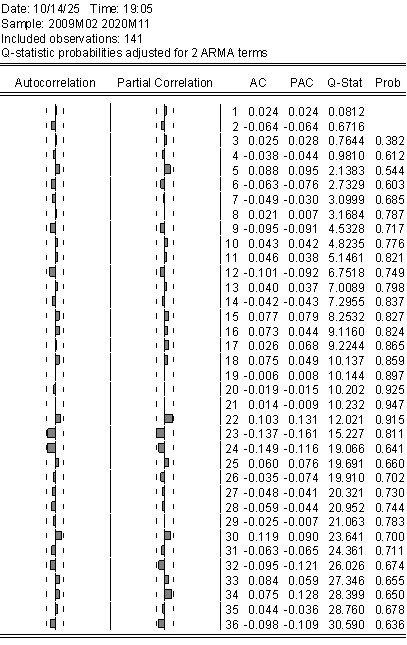
AC and PAC columns. All residual autocorrelations and partial autocorrelations are small and lie inside the approximate  band. The largest are at lags 23 and 24 (-0.137 and -0.149), which are still inside the band.
Q-stat and Prob columns. The header reads Q-statistic probabilities adjusted for 2 ARMA terms: EViews has corrected the degrees of freedom for the two ARMA terms in the model (AR(1) and MA(3)). That is why the first two lags have no probability: with two ARMA terms there are no degrees of freedom left at lags 1 and 2. From lag 3 onwards the p-values range from 0.38 to 0.95 and are all well above 0.05.
Decision: we do not reject . The residuals behave like white noise, so the model has captured the linear dependence in D(CPI). If you had found small p-values (below 0.05) at several lags, you would return to Step 4 or 5 and add or change AR or MA terms.
7B. Stability: inverse roots of the AR and MA polynomials
▶ EViews Steps (menu path)
- In the
eq_113window click View > ARMA Structure…. - Select Roots and, under Display, choose Graph (or Table for the numbers) and click OK.
✎ How to interpret this output
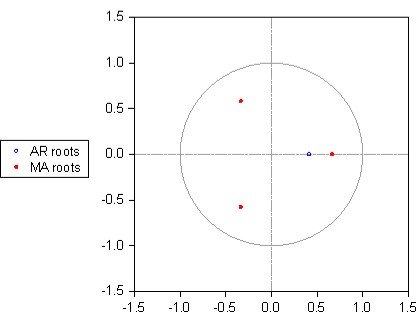
The graph plots the inverse AR roots (hollow markers) and inverse MA roots (red dots) against the unit circle. The model is stable (stationary) if the inverse AR roots lie inside the circle, and invertible if the inverse MA roots lie inside the circle.
In our model the AR root (0.41) and all three MA roots (0.67 and -0.33 ± 0.58i) are inside the circle. The model is stationary and invertible. Roots very close to the circle (modulus near 1) would be a warning sign of a near unit root or of over-differencing.
7C. Additional checks: normality and ARCH effects
▶ Optional checks (menu path)
- Normality: in the equation window, click View > Residual Diagnostics > Histogram – Normality Test. A Jarque-Bera p-value above 0.05 supports normal errors (important for the width of forecast bands).
- ARCH effects: click View > Residual Diagnostics > Heteroskedasticity Tests…, choose ARCH, and click OK. A p-value below 0.05 indicates volatility clustering and suggests a GARCH-type extension.
▶ EViews Command: residual checks
eq_113.makeresids res_113     ' save the residuals as a series
res_113.hist                  ' histogram and Jarque-Bera test
res_113.line                  ' plot the residuals to look for outliers or breaks
✎ Final remark on diagnostics
Always look at the residual plot as well. A cluster of large residuals around a specific date (for example, the unusual dip in CPI around 2020) may call for a dummy variable or a more cautious reading of the forecasts.
Conclusion of Step 7: ARIMA(1,1,3) passes the residual autocorrelation test and the stability test, so it is adequate for forecasting.
Step 8: Forecasting and forecast evaluation
With an adequate model, we can forecast. EViews can forecast the differenced variable D(CPI) or, more usefully, the level of CPI, in which case it adds the forecast changes back to the last observed level. Forecasts can be of two kinds:
- Static forecasts use the actual lagged values at each point, so they are a sequence of one-step-ahead forecasts. They can only be computed where actual data exist.
- Dynamic forecasts use the model’s own previous forecasts once the starting date is passed. These are multi-step forecasts and are what you need to forecast beyond the end of the data.
8A. Forecast 12 months ahead (2020M12 to 2021M11)
▶ EViews Steps (menu path)
- Make sure the workfile range has been extended to
2021m11(see the setup section). - In the
eq_113window click Proc > Forecast… (or the Forecast button). - Series to forecast: choose the level (CPI) rather than D(CPI). In Forecast name type
cpiforecast; optionally give a name for the standard errors such ascpiforecast_se. - Method: select Dynamic forecast.
- Forecast sample:
2020m12 2021m11. - Under Output tick Forecast graph and Forecast evaluation, then click OK.
▶ EViews Command: plot actual and forecast together
' Graph actual CPI together with the forecast series
group g_fc cpi cpiforecast
g_fc.line
✎ How to interpret this output
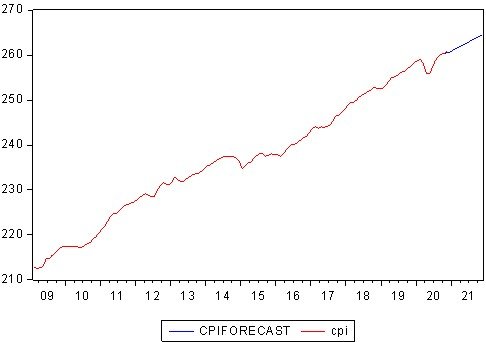
The actual series (red) ends in 2020M11 at a little over 260. The forecast (blue) continues as a nearly straight upward line and reaches about 264 by 2021M11, which is about 4 index points more than the last observation. This is the expected behaviour of an ARIMA model with and a non-zero mean: the forecast of the differenced series converges quickly to its mean (about 0.34 per month), so the forecast of the level rises along a straight line with that slope. The model therefore forecasts the trend, not the short-run ups and downs.
The widening bands in the forecast graph (plus or minus two standard errors) show that uncertainty increases with the forecast horizon.
8B. Reading the forecast evaluation box
Whenever actual values exist in the forecast sample, EViews prints a box of accuracy statistics beside the forecast graph. The practice file reports them for forecasts of CPI over a sample that begins in 2009 (the straight forecast line and widening bands starting in 2009 show this is a dynamic forecast from the beginning of the sample):
| Statistic | ARIMA(1,1,3) | ARIMA(1,1,1) |
|---|---|---|
| Root Mean Squared Error (RMSE) | 2.1764 | 2.3104 |
| Mean Absolute Error (MAE) | 1.8210 | 1.9274 |
| Mean Absolute Percent Error (MAPE) | 0.7755 | 0.8206 |
| Theil Inequality Coefficient | 0.0046 | 0.0049 |
| Bias Proportion | 0.1696 | 0.2759 |
| Variance Proportion | 0.1036 | 0.0785 |
| Covariance Proportion | 0.7269 | 0.6456 |
| Theil U2 Coefficient | 3.5838 | 3.8082 |
| Symmetric MAPE | 0.7784 | 0.8245 |
✎ How to interpret the forecast evaluation
- RMSE, MAE: average size of the forecast error in the units of CPI (index points). RMSE punishes large errors more. MAPE is the same in percent: about 0.78% for ARIMA(1,1,3). Smaller is better, and ARIMA(1,1,3) is smaller on all of them. Note that RMSE and MAE are in the units of the series, so they can only be compared between models for the same series.
- Theil inequality coefficient lies between 0 and 1; values near zero (0.0046 here) indicate a good fit between forecast and actual.
- Bias, variance and covariance proportions add up to one. The bias proportion measures how far the mean of the forecast is from the mean of the actual series, the variance proportion measures how far the variability of the forecast is from that of the actual, and the covariance proportion is the remaining, unsystematic part. A good forecast has small bias and variance proportions and a large covariance proportion. ARIMA(1,1,3) (0.17, 0.10, 0.73) is better in this respect than ARIMA(1,1,1) (0.28, 0.08, 0.65).
- Theil U2 compares the forecast with a naive “no-change” forecast; a value above 1 means the model forecasts worse than the naive one. The values here (3.58 and 3.81) are well above 1. This is not surprising for a dynamic forecast over a very long horizon, because the straight trend line cannot follow the month-to-month movements that a naive one-step forecast tracks. It is a reminder that these statistics describe trend tracking, not short-term accuracy.
Verdict: ARIMA(1,1,3) has the lower RMSE, MAE and MAPE and the more favourable error decomposition, so it is also the better forecasting model of the two.
8C. A fairer test: hold out the last 12 months
Statistics computed on data that were also used for estimation can be flattering. The standard remedy is to estimate on a shorter sample, forecast the observations you left out, and compare the forecasts with what actually happened. Here we hold out the final 12 months (2019M12 to 2020M11).
>_ EViews Command (type in the Command window)
' 1. Estimate both models on the shorter sample
smpl 2009m03 2019m11
equation eq_111_h.ls(arma=ml) d(cpi) c ar(1) ma(1)
equation eq_113_h.ls(arma=ml) d(cpi) c ar(1) ma(3)
▶ Forecast the hold-out period (menu path)
- Open
eq_113_h, click Proc > Forecast…, forecast the level of CPI, name itcpif_113h, choose Dynamic forecast, and set the Forecast sample to2019m12 2020m11. - Repeat for
eq_111_hwith the forecast namecpif_111h. - Read the evaluation box (RMSE, MAE, MAPE) for each, or compute them with the commands below.
>_ EViews Command: hold-out accuracy measures
' 2. Compute the accuracy measures over the hold-out period
smpl 2019m12 2020m11
series e_113 = cpi - cpif_113h
series e_111 = cpi - cpif_111h

scalar rmse_113 = @sqrt(@sumsq(e_113)/@obs(e_113))
scalar mae_113  = @sum(@abs(e_113))/@obs(e_113)
scalar mape_113 = 100*@sum(@abs(e_113/cpi))/@obs(e_113)

scalar rmse_111 = @sqrt(@sumsq(e_111)/@obs(e_111))
scalar mae_111  = @sum(@abs(e_111))/@obs(e_111)
scalar mape_111 = 100*@sum(@abs(e_111/cpi))/@obs(e_111)

smpl 2009m03 2020m11            ' restore the full sample
✎ How to read the hold-out results
The model with the smaller RMSE, MAE and MAPE over the hold-out months is the better genuine forecaster. If a simple benchmark, such as “next month equals this month plus the average change”, does as well as the ARIMA model, there is little reason to prefer the more complex model. Also keep in mind that unusual episodes (such as the 2020 dip) fall in the hold-out window, so differences between models in that window can reflect one-off events rather than modelling quality. When the differences are small, a formal test such as the Diebold-Mariano test is advisable before declaring a winner.
The whole workflow as one EViews program
Once you understand each step, you can run the entire analysis in one go. Create a program with File > New > Program, paste the code below, adjust the file path and press Run. A single quote begins a comment.
>_ EViews Program
' ==========================================================
' Box-Jenkins (ARIMA) workflow in EViews: CPI example
' ==========================================================

' ---- 0. Setup
wfopen "C:\data\cpi.xlsx"
pagestruct(end=2021m11)
smpl 2009m02 2020m11

' ---- 1. Identification
cpi.line
cpi.correl(36)
cpi.uroot(adf, trend, info=sic, maxlag=13)           ' level
cpi.uroot(adf, trend, dif=1, info=sic, maxlag=13)    ' first difference
series dcpi = d(cpi)
dcpi.line
dcpi.correl(36)

' ---- 2. Estimation
smpl 2009m03 2020m11
equation eq_111.ls(arma=ml) d(cpi) c ar(1) ma(1)
equation eq_113.ls(arma=ml) d(cpi) c ar(1) ma(3)

scalar aic_111 = eq_111.@aic
scalar aic_113 = eq_113.@aic
scalar sbc_111 = eq_111.@schwarz
scalar sbc_113 = eq_113.@schwarz
scalar hqc_111 = eq_111.@hq
scalar hqc_113 = eq_113.@hq
scalar arsq_111 = eq_111.@rbar2
scalar arsq_113 = eq_113.@rbar2

' ---- 3. Diagnostics (chosen model: eq_113)
eq_113.correl(36)
eq_113.makeresids res_113
res_113.hist

' ---- 4. Forecasting: use Proc > Forecast on eq_113 (level of CPI, dynamic,
'         sample 2020m12 2021m11), then:
group g_fc cpi cpiforecast
g_fc.line
Common problems and fixes
| Problem / message | Likely cause | What to do |
|---|---|---|
| Convergence not achieved or a very large number of iterations | Poor starting values, over-parameterised model, or MA roots near the unit circle | Simplify the model; raise the iteration limit in the Options tab; try dropping a lag; check for over-differencing |
| Near singular matrix | Redundant AR and MA terms (common factors) or too many terms | Remove one of the terms; compare with a simpler specification |
| Estimates differ from a textbook or another package | EViews’ C is the mean of the differenced series, and the default ARMA method may be least squares rather than ML | Check the Method line of the output and the ARMA option; compare like with like |
| Forecast option for the future dates is unavailable or all NA | Workfile range not extended | Extend the range to the end of the forecast horizon with Proc > Structure/Resize Current Page |
| Roots on or outside the unit circle | Non-stationary AR part or non-invertible MA part | Re-check the unit root tests and the order of differencing; avoid over-differencing |
| Q-statistics significant at many lags | Model has missed some dynamics, seasonality or outliers | Add AR/MA terms (including seasonal lags such as ar(12) or sar(12) for monthly seasonality), or add dummies for outliers |
| Errors such as “d(cpi) is not defined” | The series name is misspelled or not in the current page | Check the series name and the active workfile page |
How to report your results
Students often struggle to write up ARIMA results. A compact template, using our example, is:
- The ADF test fails to reject the unit root null for CPI in levels (t = -2.32, p = 0.418) but rejects it for the first difference (t = -7.76, p = 0.000), so CPI is I(1) and d = 1.
- The correlogram of the differenced series suggested ARIMA(1,1,1) and ARIMA(1,1,3) specifications. Both were estimated by maximum likelihood on 2009M03 to 2020M11. ARIMA(1,1,3), with AR(1) and MA(3) terms, was preferred on the basis of the lowest AIC (1.3345), SBC (1.4181) and HQC (1.3684), the highest adjusted R-squared (0.1946) and significant coefficients.
- The Ljung-Box Q-statistics (p-values between 0.38 and 0.95) show no residual autocorrelation, and all inverse AR and MA roots lie inside the unit circle.
- The model also yields lower forecast errors (RMSE = 2.18, MAE = 1.82, MAPE = 0.78%).
Conclusion
The Box-Jenkins methodology looks long on paper, but in EViews it reduces to a short, repeatable routine:
- Plot and test: graph the series, inspect the correlogram and run the ADF test on the level and the first difference to fix
 .
. - Identify: read the correlogram of the stationary series and shortlist candidate AR and MA terms.
- Estimate: write each candidate as
d(y) c ar(p) ma(q)with ML estimation, and compare AIC, SBC, HQC, adjusted R-squared and significance. - Diagnose: check the residual correlogram and Q-statistics, and the inverse roots graph.
- Forecast: extend the workfile range, forecast the level of the series, and evaluate accuracy, ideally on a hold-out sample.
In our CPI example, the series is I(1), ARIMA(1,1,3) with AR(1) and MA(3) is clearly preferred to ARIMA(1,1,1), it passes the diagnostic checks, and it forecasts a steady upward path with CPI at about 264 by 2021M11. If you are new to the theory behind these steps, read the companion article on the Box-Jenkins methodology, which explains stationarity, the ACF and PACF patterns, information criteria, and ARIMA variants in detail.
Have a question about an EViews output, or a series you cannot get to behave? Leave a comment below and tell me what you would like covered next, such as seasonal ARIMA (SARIMA) in EViews or ARCH/GARCH modelling.
References
- Box, G. E. P., Jenkins, G. M., Reinsel, G. C., & Ljung, G. M. (2015). Time Series Analysis: Forecasting and Control (5th ed.). Hoboken, NJ: Wiley.
- Enders, W. (2014). Applied Econometric Time Series (4th ed.). Hoboken, NJ: Wiley.
- S&P Global (EViews). EViews User’s Guide II and EViews Command and Programming Reference (sections on unit root testing, ARMA estimation and forecasting).






 MinhajMetricsHub